How Smart GoGo Geofencing Helps Secure Employee Attendance
GPS-based work-location verification for smarter, more secure employee attendance.
Smarter Attendance With Location Verification
Managing employee attendance can be challenging when employees work across different locations or need to clock in from designated job sites.
Smart GoGo helps simplify employee attendance with GPS-based work-location verification. Companies can set up an office or job site and define a virtual boundary around the location.
When an employee attempts to clock in or clock out, Smart GoGo checks the employee's GPS location against the designated work area.
What Is Geofencing?
Geofencing creates a virtual boundary around a specific geographical location.
The boundary can be created as a radius around a location or as a custom area based on a specific property boundary. Once the boundary is defined, the system can detect when a device enters, exits, or remains within the area.
A defined geographical area used to support location-based actions.
How Smart GoGo Geofencing Works
Smart GoGo checks an employee's GPS location against the designated work location when they attempt to clock in or out.
Set Work Location
The company sets up an office or job site and defines the designated work area.
Employee Clocks In
The employee attempts to record their attendance through the Smart GoGo mobile app.
GPS Location Check
Smart GoGo checks the employee's device location against the designated work-location boundary.
Allow or Block
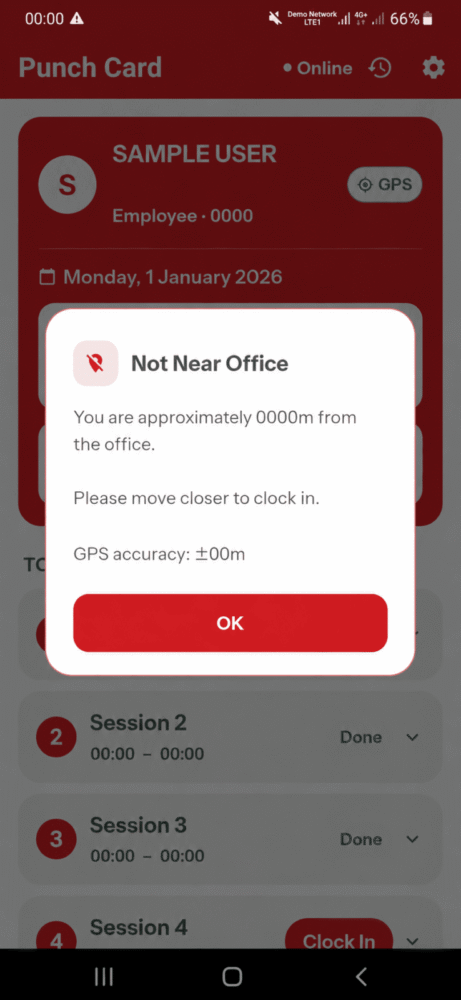
If the employee is outside the designated zone, Smart GoGo displays a "Not Near Office" alert.
Location Verification During Clocking
Smart GoGo checks the employee's location before allowing attendance clocking.
Not Near Office? Smart GoGo Lets You Know.
Smart GoGo checks the employee's GPS location before allowing attendance clocking.
If the employee is outside the designated work-location boundary, the app displays a "Not Near Office" alert.
The employee can see how far they are from the designated location, together with the GPS accuracy range.
Simple Employee Clocking Workflow
Smart GoGo provides a straightforward mobile experience from employee verification to recording attendance.
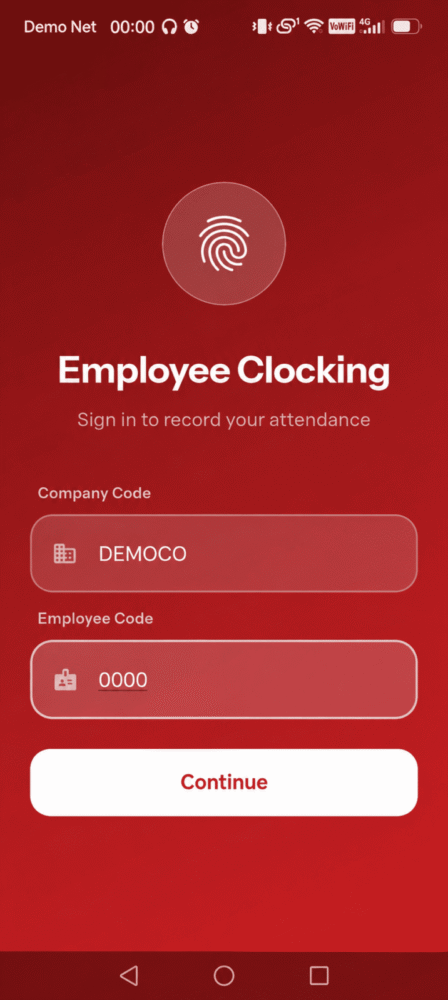
Employee Code
Enter the company code and unique employee code to begin the attendance process.
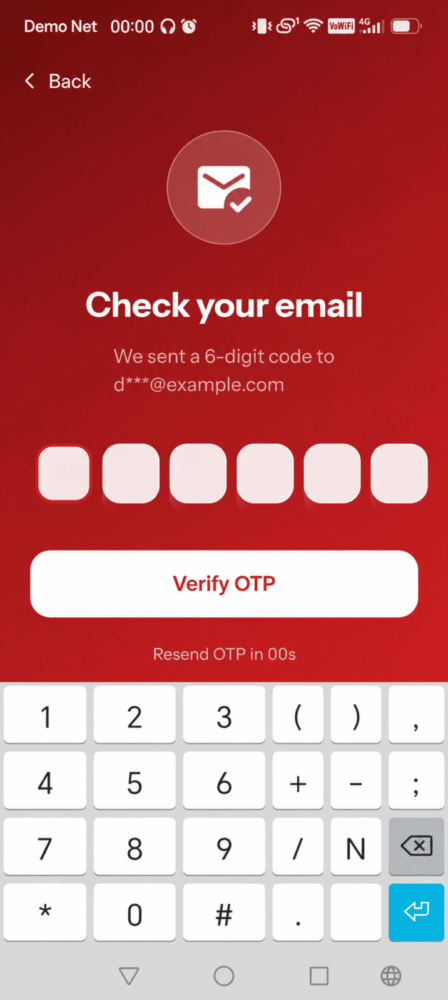
Email OTP
Verify the employee using a 6-digit code sent to their registered email.
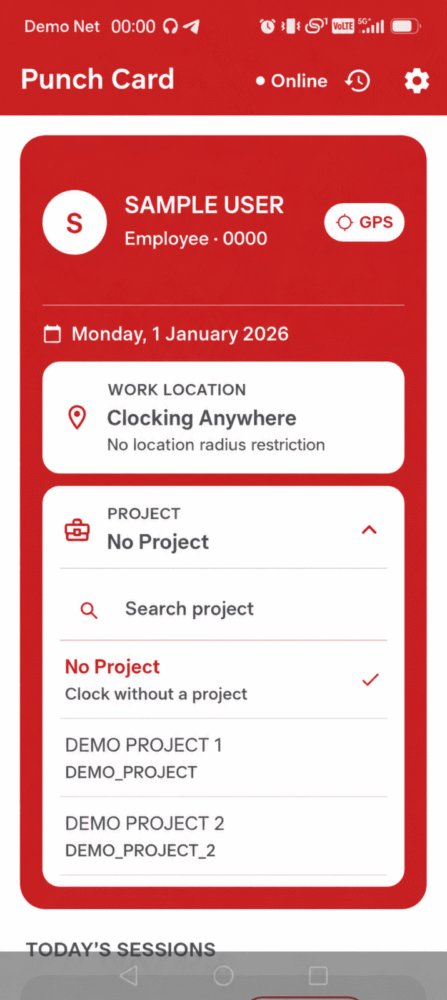
Punch Card
Open today's attendance and view current attendance sessions.
Project
Select an assigned project or choose "No Project".
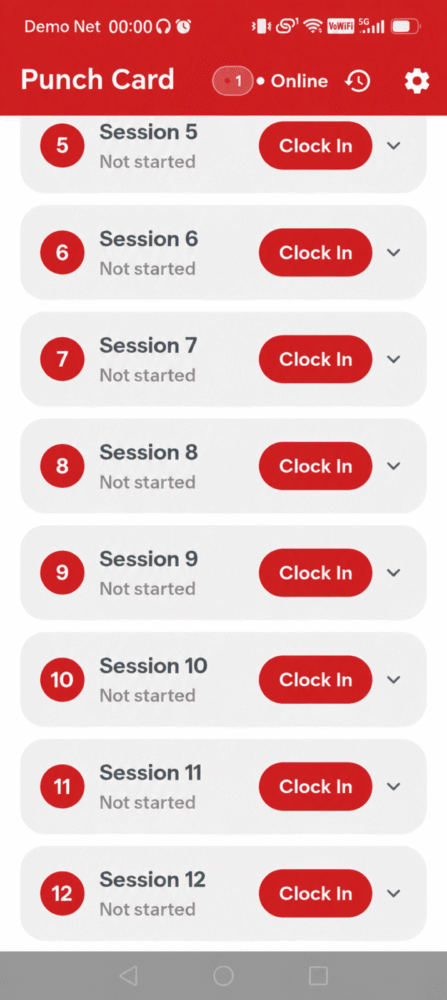
Clock In
Start an attendance session and record the employee's working time.
Clock Out
End the active attendance session when the employee finishes.
Attendance At a Glance
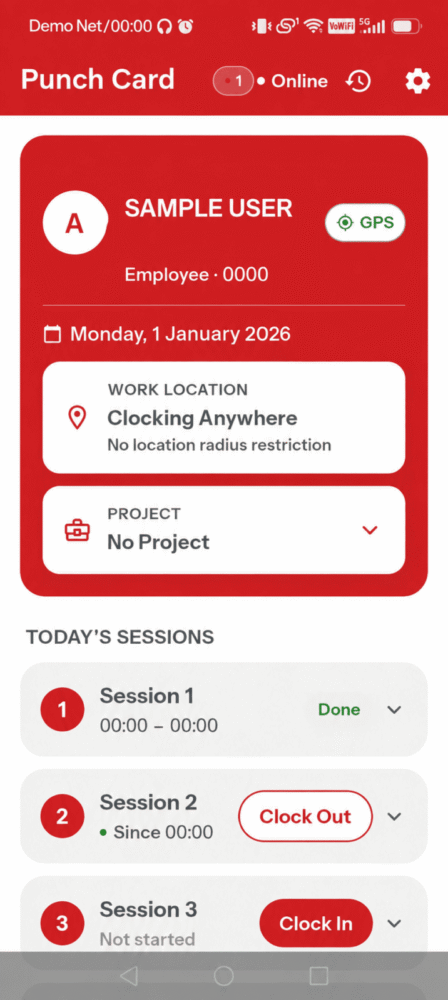
Employees can view their attendance sessions, work location information and Clock In / Clock Out actions from the Punch Card.
Everything Employees Need for Easy Attendance
Smart GoGo brings key employee clocking functions together in a simple mobile attendance experience.
GPS & Work Location
GPS and work-location information support location-based employee attendance.
Email OTP Verification
Employees verify their access using a 6-digit code sent to their registered email.
Punch Card
View today's attendance, employee information, work location and current attendance sessions.
Project Selection
Select an assigned project before recording attendance or choose "No Project".
Multiple Sessions
Track multiple clocking sessions throughout the working day with clear session statuses.
Clock In & Clock Out
Clearly start and end attendance sessions throughout the working day.
Employees can identify themselves, verify access, view their Punch Card, select a project and manage their attendance sessions.
Attendance That Knows Where Clocking Happens
Location-based verification gives businesses greater visibility and control over employee attendance at designated work locations.
Location Verification
Smart GoGo checks the employee's GPS location against the designated work-location boundary when attendance is recorded.
Helps Prevent Off-Site Clocking
Employees outside the designated work area are prevented from clocking in until they move within the permitted location.
Clear Employee Feedback
When clocking is blocked, employees receive a "Not Near Office" alert together with distance and GPS accuracy information.
Simple. Secure. Trackable.
Smart GoGo brings the essential employee attendance process together in one mobile experience.
From employee verification and GPS work-location checking to project selection and attendance sessions, employees can manage their daily clocking activities through the Smart GoGo mobile app.
The clear workflow helps employees understand their attendance status while location verification helps businesses maintain their designated work-location controls.
Attendance Ready
Work location verified
Make Employee Attendance Smarter & More Trackable
Simplify your employee attendance workflow with Smart GoGo's mobile clocking, GPS work-location verification and attendance tracking features.