
The Ultimate 2026 Guide to Overtime
Calculations in Malaysia
Staying compliant with Malaysia’s labor laws is crucial for any business, especially when it comes to compensating employees for their extra hours. Since the major amendments to the Employment Act 1955 (EA 1955) took effect, the rules around overtime have changed significantly.
Whether you are managing a small team or running a large enterprise, manually crunching the numbers can lead to costly compliance errors. This guide breaks down the latest statutory requirements, the exact formulas you need to use, and why upgrading your payroll software is the best move you can make for your business this year.
Key Updates to the Employment Act 1955
If you are still calculating overtime based on old rules, you could be risking severe fines. Here are the critical updates under the amended EA 1955 that every HR professional must know:
- New Salary Threshold: Overtime entitlement now covers all employees earning RM4,000 and below per month (increased from the old RM2,000 limit). Manual laborers and workmen are entitled to overtime regardless of their salary.
- Reduced Working Hours: The maximum normal working hours have been reduced from 48 hours to 45 hours per week.
- Overtime Limit: Employees are capped at a maximum of 104 overtime hours per month.
How to Calculate Overtime in Malaysia
To accurately calculate overtime, you first need to determine the employee’s Ordinary Rate of Pay (ORP) and Hourly Rate of Pay (HRP).
The Basic Formulas:
- Ordinary Rate of Pay (ORP): Monthly Salary / 26 days
- Hourly Rate of Pay (HRP): ORP / Normal daily working hours (usually 8 hours)
Once you have the HRP, you apply the statutory multipliers based on when the overtime was worked:
Work Day Type | Statutory Overtime Rate |
Normal Working Day | 1.5 × Hourly Rate |
Rest Day (Exceeding normal hours) | 2.0 × Hourly Rate |
Public Holiday (Exceeding normal hours) | 3.0 × Hourly Rate |
Example Scenario
Let’s say an employee earns RM 2,600 a month, works an 8-hour shift, and does 4 hours of overtime on a normal Tuesday.
- ORP: RM 2,600 / 26 = RM 100
- HRP: RM 100 / 8 = RM 12.50
- Overtime Pay: RM 12.50 × 1.5 × 4 hours = RM 75.00
Why You Need a Reliable OT Calculator
Manually applying these formulas for an entire workforce is time-consuming and prone to human error. By utilizing an ot calculator, HR teams can instantly determine exact payout amounts without second-guessing. A localized ot calculator malaysia takes the specific EA 1955 rules—such as the 26-day ORP divisor and RM4,000 threshold—into account automatically, ensuring 100% legal compliance.
Automate Your Business with the Right Payroll Software
Instead of relying on standalone tools or messy spreadsheets, the most efficient businesses integrate these calculations directly into their systems.
Upgrading to a comprehensive payroll software malaysia means overtime hours tracked by your biometric or time-attendance systems flow seamlessly into digital payslips. Modern payroll software does heavy lifting by automatically applying the 1.5x, 2x, or 3x multipliers depending on the day the employee clocked in.
Furthermore, investing in an integrated hr software malaysia solution allows you to manage leave, shift rosters, and statutory deductions (like EPF, SOCSO, and PCB) from a single dashboard. This doesn’t just keep you compliant with the Department of Labour—it saves your HR department countless hours every month.
Overtime Calculator Malaysia Directory
√ Monthly Employee Overtime Rate
√ Daily Overtime Calculator Rate
√ Contact Us For Payroll Software System
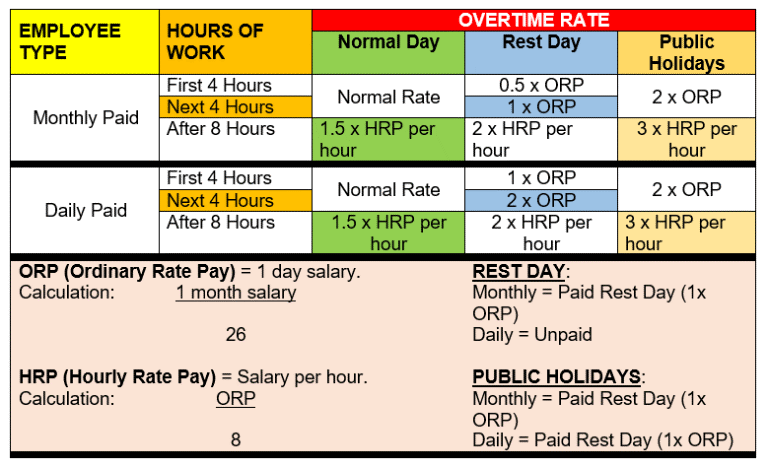
Overtime Calculator pay is calculated as follows:
- Hourly basic rate of pay x 1.5 x number of hours worked overtime calculator
| For this category of employee | Hourly basic rate of overtime calculator pay is |
| Monthly-rated employee | (12 x Monthly basic rate of pay) / (52 x 44) |
| Daily-rated employee | Daily pay at the basic rate / Working hours per day |
| Piece-rated employee | Total weekly pay at the basic rate of pay / Total number of hours worked in the week |

Rest Days or Public Holidays for Overtime Calculator Malaysia for Payroll Software Malaysia
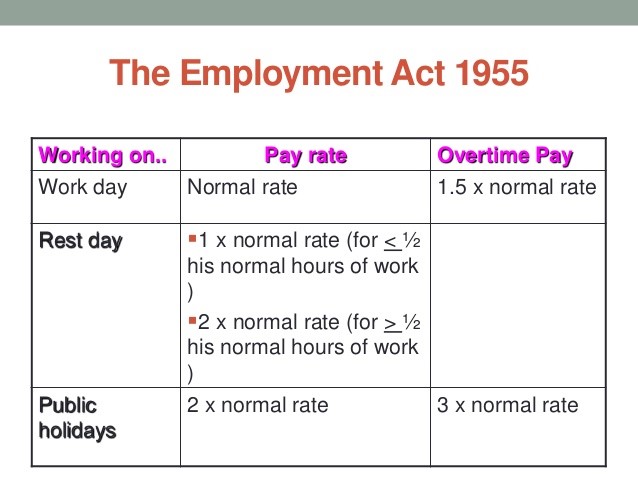
A rest day comprises 1 whole day (midnight to midnight). It is not a paid day.
No employee shall be compelled to work on rest day unless he is engaged in work which by reason of its nature requires to be carried on continuously or continually by two or more shifts.
The overtime calculator for a monthly rated employee is different from the daily rated employee. Monthly rated employee is paid according to a calendar month while the daily rated employees do not get paid for the rest days.
The employer determines the rest day, which can be on a Sunday or any other day. If the rest day is not a Sunday, your employer should prepare a monthly roster and inform you of the rest days before the start of each month. The maximum interval allowed between 2 rest days is 12 days
Monthly Rated Employee in Overtime Calculator For Payroll Software Malaysia
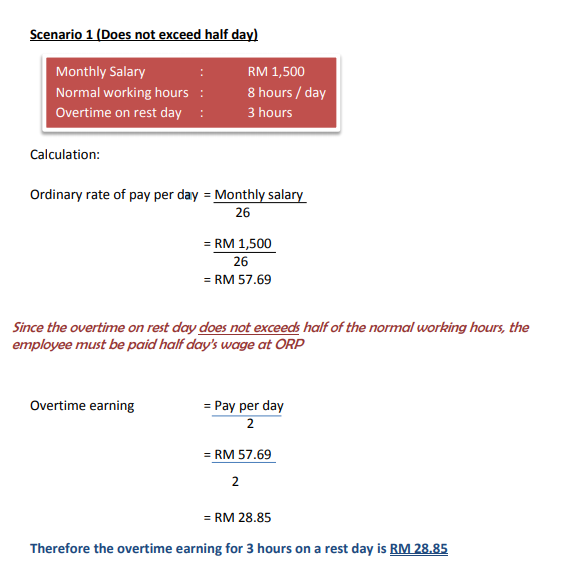
Employee employed on a monthly rate of pay who works on a rest day (Under Act Section 60 (3)(b)(i) EA 1955) Shall be paid for any period of work which:
- Does not exceeds half his normal hours of work, wages equivalent to half the ordinary rate of pay for work done on that days
- More than half but which does not exceed his normal hours of work, one day’s wages at the ordinary rate of pay for work done on that day
Overtime Calculator for Daily Rated Employee in Payroll Software Malaysia
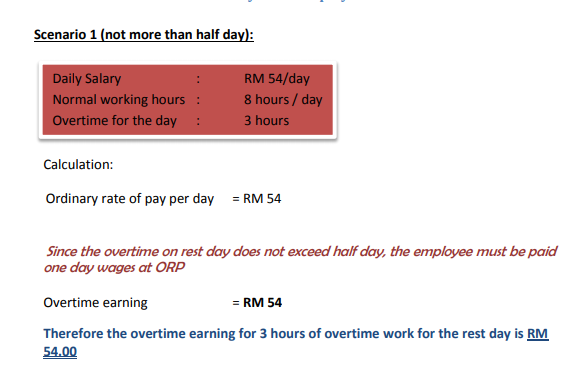
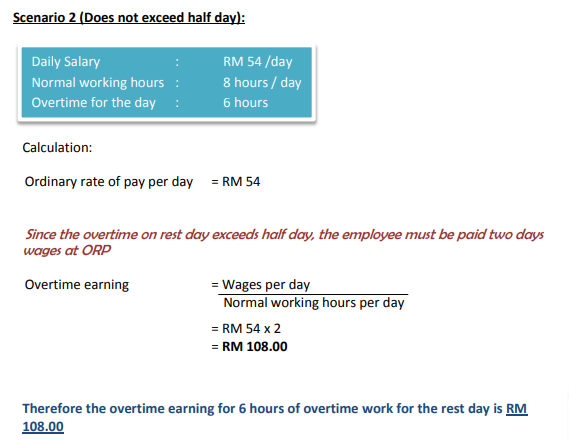
Employee employed on a daily, hourly or other similar rate of pay who works on a rest day (Section 60 (3)(a)(i) EA 1955) Shall be paid for any period of work which:
- Does not exceed half his normal hours of work, one day’s wages at the ordinary rate of pay
- Which is more than half but does not exceed his normal hours of work, two days wages at the ordinary rate of pay
Maximum hours of Work in Overtime Calculator for Payroll Software Malaysia

As an employee, you are not allowed to work more than 12 hours a day.However, your employer can ask you to work more than 12 hours a day in the following circumstances:
- An accident or threat of accident.
- Work that is essential to the life of the community, national defence or security.
- Urgent work to be done to machinery or plant.
- An interruption of work that was impossible to foresee.
Working more than 12 hours a day (overtime calculator exemption)
If an employer requires employees to work more than 12 hours a day (up to a maximum of 14 hours), they must apply for an overtime calculator exemption.
Maximum hours of Overtime Calculator Rate in Payroll Software Malaysia
An employee can only work up to 72 overtime hours in a month. Employers can apply for an exemption if they require employees to work more than the 72 hours of overtime in a month. Note: these work activities will not be granted exemption.
Contact Us For More Details on Payroll Software Malaysia Solution with Overtime Calculator
We specialized in smart systems such as Payroll Software Malaysia and Singapore, Time and Attendance Management System (TMS) which able to integrated with variety of Biometrics Devices including Fingerprint, facial and handpunch. We also provide latest BCA EPSS Biometrics Authentication System (BAS) for Singapore BCA ePSS Submission. Others system including, Access Control Solutions, Project Costing Solutions, HR Solutions, Worker Dormitory System, Hostel Billing Managment System, Visitor Management System (VMS), and Cloud based Time Attendance System for multi-chain solutions.
Smart Touch Technology Sdn Bhd
Address: 36-02 & 36-03, Jalan Permas 10, Bandar Baru Permas Jaya, 81750 Masai, Johor, Malaysia.
Contact Number: +607-388 9903
For More Details, please click HERE.
Package Price For Payroll Software Malaysia Solution with Overtime Calculator
Smart Touch Technology “STT” is software, hardware & consultancy company. “STT” is specialized in the field of software development, system integration, implementation, systems support, and marketing of “STT” applications in one single database solution. “STT” has developed programs such as payroll Software Malaysia, SmarTime (Time & Attendance Systems), Job Costing System, Leave Management System, ID Badges Card System, Security & Access Control System and Visitor Management System.
“STT” is involved in installing numerous systems in both Singapore & Malaysia. “STT” software applications come with standard or customized (according to customers’ specifiction) solutions. The objective of the software design is to offer a flexible user-friendly software that is easy to implement, modify and upgrade.
Click HERE for more Pricing Details >> Package Price
More Related Info For Hr Software Malaysia With Overtime Calculator >>